
Free Instagram comment auto replies work best when they use post context, not triggers. ReplyMagic drafts replies from each post's image or Reel.

Can you auto reply to Instagram comments for free?
Yes, but "free" and "comment auto-reply" mean several different things, and most of them aren't a public comment bot. Instagram's own AI auto replies handle messages and message requests, not comments on your posts. That distinction, according to Instagram's Help Center, is where most people get confused.
Real comment automation splits into two jobs. First, public replies: an answer posted back in the thread where everyone can see it. Second, comment-triggered DMs: someone comments a word, and a private message lands in their inbox. Those are separate workflows with separate rules.
The free comment-to-DM route runs through Meta's official API. The Creator Lane guide says the only sanctioned way to auto-DM after a comment is the Instagram Graph API private reply flow, which shipped in Graph API v18.0 in late 2023.
If your pain is repeat questions on launch posts and viral Reels, public replies usually do more work: one good answer helps everyone reading.
What's the difference between Instagram saved replies, away messages, and comment automation?
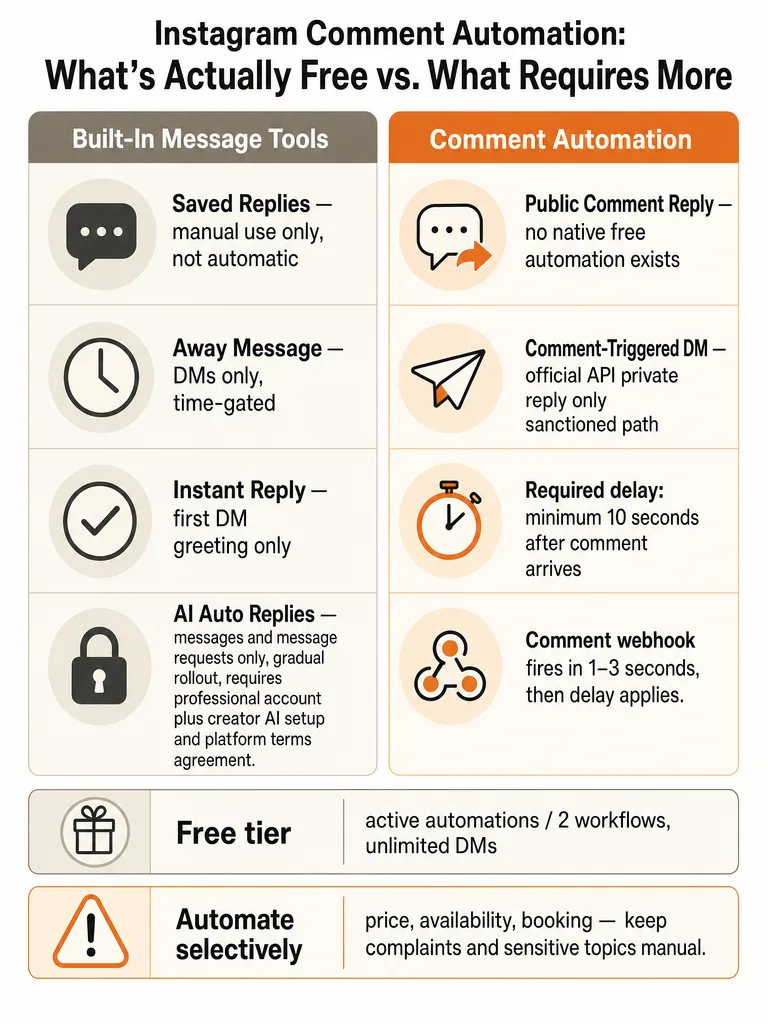
Five features get lumped together in search results, and only two of them touch public comments. The rest are DM tools. Sorting them out saves you from setting up the wrong thing.
Here's how they break down:
| Feature | What it does | Where it lives |
|---|---|---|
| Saved replies | Stores canned text you paste manually into DMs | Instagram DMs |
| Instant Reply | Sends one automatic greeting to new DMs | Meta Business Suite |
| Away Message | Auto-replies to DMs outside your set hours | Meta Business Suite |
| Public comment replies | An answer posted back in the comment thread | Your post comments |
| Comment-triggered DMs | Sends a private DM when someone comments a keyword | Graph API private reply |
Saved replies, Instant Reply, and Away Message are all message tools. None of them post a public answer under your Reel or carousel. Treat public comment replies and private-message replies as separate workflows.
The confusion in search results comes from tools that automate DMs while calling themselves "comment auto-reply," even though they never touch the public thread. If a commenter asks about price or sizing in the open, a public reply answers them and everyone else scrolling past.
Does Instagram have a built-in auto reply for comments?
Instagram's built-in AI auto replies apply to messages and message requests, not public post comments. According to Instagram's Help Center, your creator AI responds to a selected audience: anyone you don't follow, followers you don't follow back, or only people you choose. It never posts under your photo or Reel.
The feature is also not universal. Instagram says it "is being gradually introduced and may not be available to you yet," and it's only on the Instagram mobile app. So even the message version isn't something every account can switch on today.
You keep control at the chat level. Instagram lets you turn AI auto replies off for all chats or for one individual chat, and manual replies temporarily pause the AI while you respond.
So if your problem is comment volume during a product drop, the native tool isn't the fix.
Do you need a Business or Creator account for Instagram auto replies?
You need a professional account, meaning a Business or Creator account, before any official Instagram automation works. That's the baseline for both Instagram's native AI replies and any tool built on Meta's API.
For Instagram's own AI auto replies, the Help Center lists three requirements: a professional account, a creator AI built with Meta AI Studio, and agreement to the Instagram Creator AI Terms. Skip any one and the toggle won't appear.
For comment-triggered DMs and public reply tools, the connection runs through Meta's official OAuth login. That's the safer path. The Creator Lane guide is direct that official API access, rather than browser hacks, is what keeps setups compliant.
ReplyMagic connects the same way, through Instagram Business OAuth, so no password ever changes hands. A personal Instagram account cannot run official comment automation, period. Switch to professional first, then set up the tool.
How to auto-DM on Instagram for free?
Comment-triggered auto-DMs are free and compliant when routed through Meta's official Graph API private reply endpoint. The Creator Lane guide calls this "private replies" and says it shipped in Instagram Graph API v18.0 in late 2023, and remains the only sanctioned way to auto-reply to a comment with a direct message.
The mechanism runs in a specific order:
- Someone comments on your post or Reel. Instagram sends a comments webhook to your server within 1, 3 seconds, according to Creator Lane.
- The tool matches the comment against your trigger, then waits. Meta requires a minimum 10-second delay before the private-reply DM goes out.
- The DM lands in the commenter's primary inbox, since they messaged you first via the comment.
On the free tier, expect hard limits. Creator Lane says its own free plan covers 2 active automations with unlimited DMs on those automations. That's enough to test the flow on a couple of posts, not to run a full launch.
Auto-DM is the right tool for a single link handoff. It's the wrong tool when the same question keeps appearing in public and everyone benefits from seeing the answer.
Public replies vs comment-triggered DMs: which one do you need?
Public replies help everyone reading the thread; comment-triggered DMs move one person into a private conversation. Pick based on whether the answer is useful in the open or needs to stay private.
Use public replies when the question repeats and the answer helps the crowd:
- Price on a product drop
- Sizes and fit
- Availability, restock, or "is this still in stock?"
- Booking windows and general rates
- Enrollment dates and cohort start times
Use comment-triggered DMs when the exchange is one-to-one:
- Sending a link, coupon, or PDF
- Booking specifics tied to one person's dates
- Anything you'd rather not display publicly
| Job | Best workflow | Why |
|---|---|---|
| Repeat FAQ everyone asks | Public reply | One answer serves the whole thread |
| Deliver a link or lead magnet | Comment-triggered DM | Keeps the thread clean, tracks the lead |
| Sensitive or personal detail | DM redirect | Private by default |
Most brands need both, but public replies do the heavy lifting on price, sizes, and availability. ReplyMagic drafts the public reply and can suggest a "DM me" redirect when a question belongs in private. It responds to public comments; it isn't a DM bot.
Is Instagram comment automation safe?
Official API-based comment automation is the safe path; browser automation and unofficial endpoints are the main way accounts get banned. The Creator Lane guide is blunt that browser automation and unofficial API endpoints are the primary cause of Instagram account bans, while the official Graph API is the compliant route.
Safety comes down to two questions. Does the tool connect through Meta's official OAuth, and does it respect Meta's timing rules? The mandatory 10-second delay before a private-reply DM exists for a reason: it keeps the behavior inside sanctioned limits rather than firing like a bot.
If a tool asks for your Instagram password instead of routing you through Meta login, treat that as the ban-risk signal to walk away from.
Beyond the API, safety also means not embarrassing the brand. ReplyMagic runs pre-LLM spam gates that filter scams, link bait, and abuse before any reply is drafted, so scam bait never turns into a polished response.
The sources here don't verify claims about reach lifts or ranking boosts from automation, so treat those pitches skeptically.
When should you not automate an Instagram comment?
Some comments should never auto-send. Complaints, service issues, sensitive wellness questions, policy disputes, and anything needing human judgment belong in manual replies or a review queue. Keep customer questions and complaints in a manual review workflow when they need human judgment.
Keep these off auto-send:
- A public complaint about a delayed order or a bad experience
- Health, medical, or wellness questions that need care and guardrails
- Refund, cancellation, or policy disputes
- Anything ambiguous where a wrong answer damages trust
- Comments that read like a person is upset
For wellness and health-adjacent brands, this line matters more, since a confident wrong answer on a sensitive topic is worse than no answer.
The fix isn't "automate nothing." It's a review mode that lets obvious questions through and holds edge cases for a human. ReplyMagic's approval queue does exactly that.
Why keyword triggers break on real Instagram posts
Keyword triggers fire on the word, not the meaning, so they misread real posts constantly. A rule watching for "price" answers a comment that says "worst price I've ever seen" the same way it answers a genuine buyer. The trigger can't tell the difference, and it can't see what the post actually shows.
That's the core weakness. A keyword rule reads text against a list. It doesn't know whether the post is a product drop, a testimonial, or a cohort launch, so the same trigger can fire on the wrong post and post a reply that makes no sense to anyone reading.
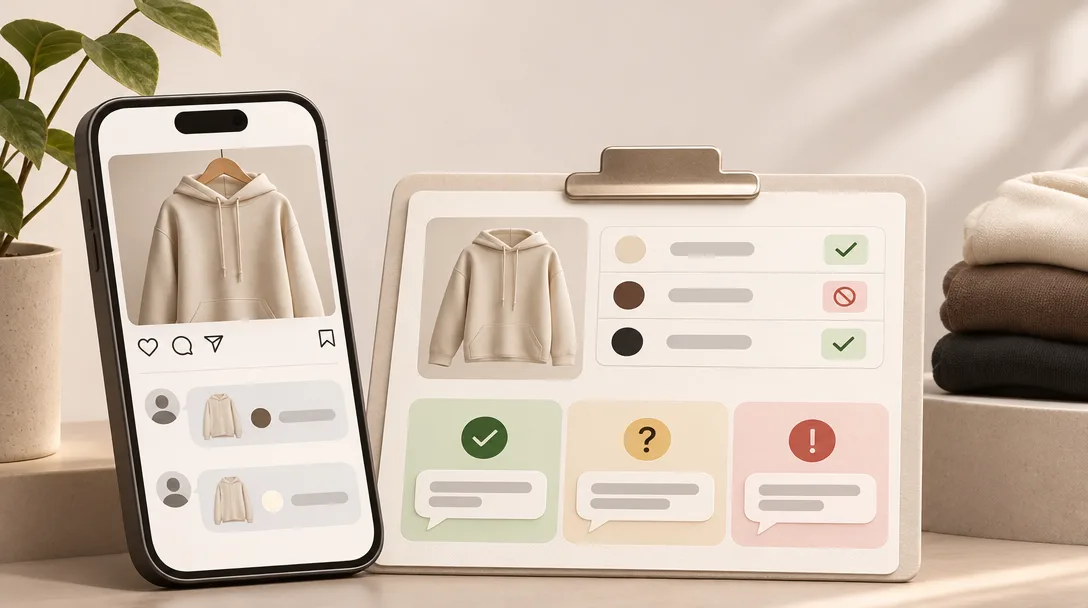
Context, not triggers. ReplyMagic uses Google Gemini to analyze each post's photo, Reel, or video before drafting, so the reply references what's actually in the post rather than guessing from a matched word. A comment asking "what size is that?" gets answered against the item shown, not a keyword table.
The brand voice comes from the same place. Replies are conditioned on the connected account's past replies, tone, emoji habits, and sign-offs, so a teammate's draft still sounds like the brand.
Control mechanisms handle the rest:
- Approval queue holds drafts until you okay them
- Review mode lets you edit before anything posts
- Per-post settings turn automation on or off for a single post
- Exclusion phrases block auto-replies on comments you flag
- Spam gates filter scams and link bait before AI runs
That combination handles price, sizes, booking, availability, shipping, enrollment, and policy questions accurately, without the misfires that make keyword bots keep failing.
How to choose a free Instagram comment auto-reply setup
Pick your setup by matching the tool to the job: native free tools for DM basics, official comment-to-DM for link handoffs, and a context-aware assistant for public replies at volume. There's no single "best" here, only the right fit for your comment problem.
Run through this checklist:
- Do you need public replies or DMs? Native Instagram AI covers DMs only, per the Help Center.
- Is your volume real or occasional? Creator Lane's free plan caps at 2 active automations. Fine for testing, tight for a launch.
- Do you want to review before it posts? If yes, you need approval or review mode, not blind auto-send.
- Does the reply need to match what the post shows? Then keyword rules won't cut it.
Where ReplyMagic fits: post-aware public replies with control built in. The Free plan is 30 posted replies per month on 1 Instagram account. Pro is 3,000 replies per month on 1 account. Adding another Instagram account is $15/month for that account plus 3,000 more replies.
| Setup | Free limit | Best for |
|---|---|---|
| Native Instagram AI | Selected-audience DMs | Message auto-replies |
| Official comment-to-DM | 2 automations (Creator Lane) | Link and lead handoffs |
| ReplyMagic | 30 posted replies per month | Context-aware public replies |
Where to go deeper on approval mode, safe setup, and multilingual replies
Once you've picked a workflow, these guides cover the specifics. For control setups, see how an AI Instagram comment assistant with approval mode and the approval queue or full auto choice actually work.
For risk, read how to auto-reply to Instagram comments safely and the safe setup guide.
Serving international audiences? ReplyMagic replies in whatever language the commenter wrote in, automatically, not as a setting. See reply in 100+ languages.
For specific scenarios, there's surviving a viral launch flood, service booking questions, and course launch FAQs.
Ready to answer the repeat questions in your own voice? Get started with ReplyMagic.
Frequently asked questions
Does Instagram have a built-in auto reply for comments?
Instagram's native AI auto replies cover messages and message requests only: they never post under a photo, Reel, or carousel. Per Instagram's Help Center, the feature also requires a professional account, a creator AI built in Meta AI Studio, and agreement to the Creator AI Terms. It's being rolled out gradually and is only available on the Instagram mobile app, so not every account can enable it today.
What's the difference between comment-triggered DMs and public comment replies on Instagram?
Comment-triggered DMs send a private message to one person after they comment a keyword: useful for handing off a link, coupon, or booking page. Public replies post an answer back in the open thread where every reader sees it. When the same question about price, sizing, or availability repeats across a launch post or viral Reel, one public reply does the work of dozens of individual DMs.
Find AI Instagram comment assistant with safe auto-send
Safe auto-send depends on two things: connecting through Meta's official OAuth (never sharing your password with a third-party tool) and respecting Meta's API timing rules. On the automation side, pre-LLM spam gates should filter scams and link bait before any reply drafts. ReplyMagic handles both: it connects via Instagram Business OAuth and runs spam gates before Google Gemini drafts a single word, with an approval queue available for edge cases.
Context-aware Instagram comment automation tool: how does it work differently from keyword rules?
Keyword rules match text against a list; they can't tell whether a post is a product drop, a testimonial, or a course launch, so the same trigger misfires across unrelated posts. A context-aware tool reads the actual post first. ReplyMagic uses Google Gemini to analyze each photo, Reel, or video before drafting, so a reply to "what size is that?" references the item shown: not a matched word pulled from a trigger table.
AI Instagram comment assistant with approval queue: how does review mode work?
Approval queue mode holds every AI-drafted reply until a human reviews and approves it before anything posts publicly. ReplyMagic also offers per-post settings to turn automation on or off for a single post, exclusion phrases to block auto-replies on flagged comments, and review mode so teammates can edit drafts before they go live. That combination lets obvious questions: price, availability, enrollment dates: auto-draft while complaints and edge cases wait for a person.
Get started with multilingual Instagram comment replies: does the tool handle multiple languages automatically?
ReplyMagic replies in whatever language the commenter wrote in: automatic, not a setting to configure. A Spanish comment on a travel post gets a Spanish reply; a French question about booking rates gets a French answer. For hotels, B&Bs, and travel creators fielding comments across time zones, that removes the manual step of identifying language before routing to the right teammate.